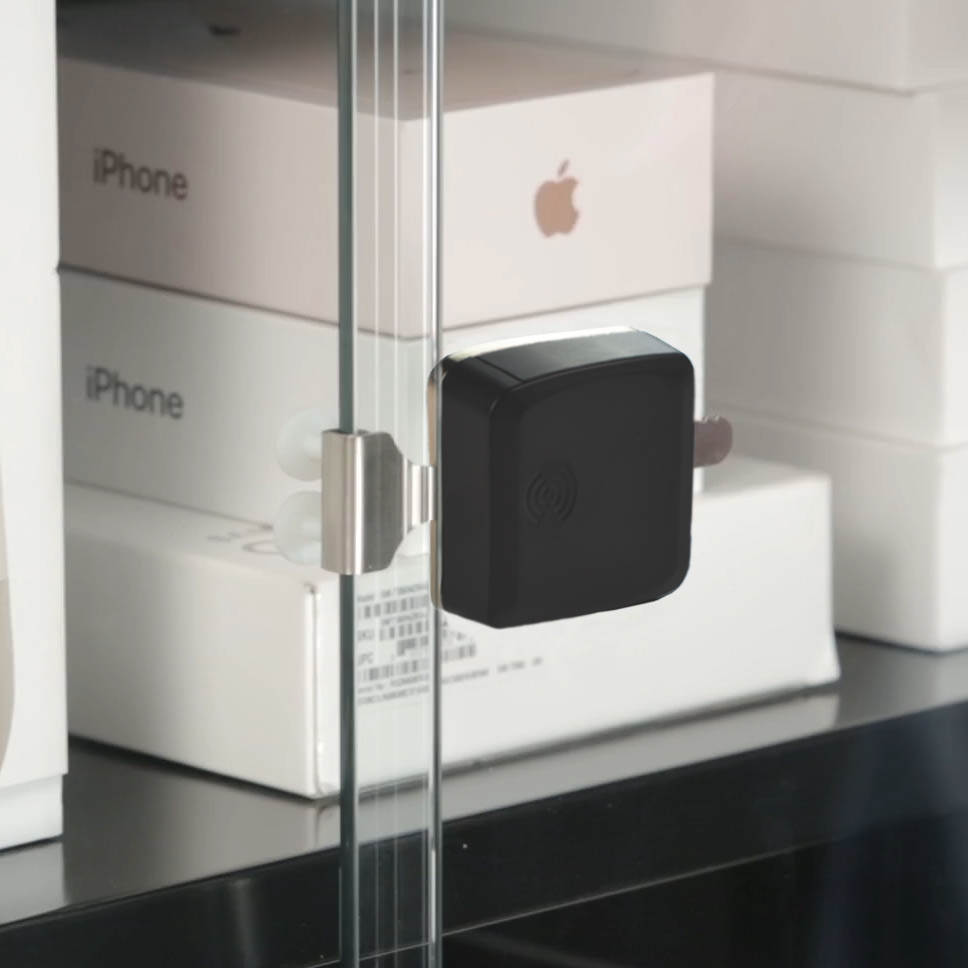
Smart Locks for Merchandising Displays
Display cabinets, drawers and glass cases hold the premium items, accessories and backstock that customers can see but should not handle freely. Keeping them locked usually means shared metal keys that get copied, misplaced or handed from shift to shift, with no record of who opened a display. MTI smart locks replace those keys with electronic locks that open with an individual RFID card or fob, and Managed Access software records each access, so operations and loss prevention teams can control and review who gets into a display.
Why Merchandising Display Access Is Hard to Control
Displays are opened many times a day to restock, reset a fixture, pull a demo unit or bring a customer something from behind the glass. That routine creates a few recurring problems:
- Shared and duplicated keys: once keys are copied or passed along, no one can say for certain who still has access to a display.
- Slow restocks and resets: staff lose time finding the right key for the right fixture.
- No record of access: when merchandise goes missing, there is nothing to show who opened the display or when.
- Rekeying after staff changes: displays need rekeying when employees leave, or former employees may still hold keys.
How MTI Smart Locks Secure Display Cabinets and Glass Cases
Each employee gets an RFID card or fob. When they hold it to a lock, the lock checks it against the access rules set in Managed Access and releases only if the employee is authorized. Bluetooth access is also available, depending on the lock and software.
- Access tied to a person: a manager chooses which locks each employee can open, so a jewelry associate can be set up for the jewelry cases only.
- An activity record: Managed Access shows which credential opened which lock and when.
- No rekeying: when someone leaves or loses a card, a manager removes that credential in the software and everyone else’s access continues as before.
- Works with existing fixtures: MTI smart locks are designed to work with existing fixtures without expensive power drops, and the sliding glass door locks run on replaceable batteries rated for up to 18 months.
Which MTI Smart Lock Fits Display Cabinets and Sliding Glass Doors?
The right lock depends on how the display closes. Start with whether the door swings, slides or latches with a hasp, and check the glass thickness if it slides.
| Lock | Best for | How it fits | Good to know |
|---|---|---|---|
| Twist™ Blade Lock | Hinged or fixed cabinet doors and drawers on display cases, product cabinets, accessory displays and electronics or mobile device fixtures. | Three mounting options: through-hole, bushing or adhesive pad. Can be set up for clockwise or counterclockwise operation. | All-metal enclosure. Runs on replaceable CR2477 batteries. |
| Slide™ Ratchet Lock | Bypass sliding glass doors with glass from 1/4 to 3/4 inch (6 to 19 mm) thick, such as larger jewelry or electronics cases. | Ratcheting latch with two latch configurations for different glass weights. Retrofits onto existing cabinets. | Replaceable CR123 battery rated for up to 18 months. Audible alerts, including low battery. |
| Slide™ Push Lock | Slimmer bypass sliding glass doors, 1/8 to 1/4 inch thick, such as jewelry counters and smaller electronics displays. | Compact, low-profile push-release design. Retrofits onto existing displays. | Replaceable CR123 battery rated for up to 18 months. Audible alerts, including low battery. |
| Click™ Padlock | Merchandise zones that close with a hasp, including restricted merchandise zones and temporary or movable secured areas. | Padlock with a 9 mm hardened steel shackle, available in 2-inch and 6-inch lengths. | Two replaceable AAA batteries rated for up to 18 months. Designed for indoor and outdoor use. |
If you are choosing between the two sliding glass door locks, glass thickness decides it, so measure the glass before you order. All four lock styles work with Managed Access, so a store with several display types can manage every lock in one system.
Managed Access Options for Display Case Locks
There are four ways to run Managed Access. The right one depends on how many stores you manage and how much activity history you want to keep:
- RFID Keys + Locks: replaces mechanical keys with programmable RFID cards for a single-location business with basic access needs. One lock supports up to 250 credentials.
- RFID Keys + Locks with Centralized Management: manages users and locks from one station at a single location, with support for up to 100 locks and 100 users.
- Smart Locks + On-site Software (Managed Access Pro): tablet-based, on-site management with 30 days of analytics and activity logs, tracking access by user and by lock.
- Smart Locks + Remote Software (Managed Access Enterprise): cloud-based access control for multi-location retailers, with remote activity tracking, one year of analytics history and a mobile interface for remote actions.
The Managed Access software page compares these options in more detail.
Is This Right for Your Merchandising Displays?
If keys are shared across shifts, restocks are slowed by key hunting, or you manage displays across several stores and want the same access rules in each, it is worth a closer look. Consumer electronics retailers, jewelry stores and other retailers with several display types can match each fixture to the right lock and manage them together. RTF Global can help map locks and a Managed Access option to your display footprint.
Related Retail Technology Solutions
Retail Display Security
Anti-theft display solutions that let customers handle high-value merchandise while keeping it secured.
Electronic Shelf Labels
Electronic shelf labels that update shelf prices across your stores from one screen.
Merchandising Display Smart Lock FAQs
Yes. The Slide™ Ratchet Lock fits bypass sliding glass doors from 1/4 to 3/4 inch thick, and the Slide™ Push Lock fits slimmer glass from 1/8 to 1/4 inch. Both are battery powered and open with an RFID card or fob.
Yes. With Managed Access software, managers can review which credential opened which lock and when. The on-site option keeps 30 days of analytics and activity logs, and the cloud-based option keeps one year of analytics history.
A manager removes that credential’s access in Managed Access, and the card no longer opens any lock. Other employees’ cards keep working, and the locks do not need to be rekeyed.
MTI smart locks control employee access to cabinets, drawers and glass cases. For products that customers handle on open display, such as phones, tablets and power tools, RTF Global’s display security products keep the merchandise protected while keeping it hands-on.
Request an MTI Smart Locks Demo or Quote for Your Merchandising Displays
Merchandising displays need to stay open to employees and closed to everyone else. Individual RFID credentials and an activity record give operations teams a way to manage that without passing keys around, and without limiting how customers shop.
RTF Global is the Canadian distributor of MTI smart locks. Tell the team what types of display doors you have, how many stores you manage and who needs access, and we can recommend a setup.
